Hey there, I’m at my wits end trying to figure out an electrical issue on a kobelco 135 excavator. It’s a SRLC, approx year 2000, serial number YH01-. I’m really hoping someone out there might have some insight. It’s got about 7k hours and we just bought it to work on the farm. The machine is tight for its age and has clearly been pretty well greased and maintained over the years. Got it home, changed all the fluids, filters, repacked all the cylinders, and gave the machine a good wash. Haven’t used it yet on any projects because it has developed an intermittent electrical issue. I only ran it twice before I noticed the issue but the issue did appear after I pressure washed the machine. It’s unclear if this is coincidental or not. The cab wasn’t pressure washed, and no water has been anywhere near the CPU. When the issue is present the screen shows a #1 CPU failure code for the mechatronic controller. I have the original kobelco factory service manual. I can’t run the computer diagnostic test because the CPU is just reading failure, it won’t let you get to the diagnostic screen. The strange part is this issue is intermittent. If you start the machine for the first time in 24-48 hrs the machine will fire right up. It will run completely fine, no codes on the screen. Then when you shut it off, if you immediately turn it back on it will say that mechatronic failure code and the machine will stay at idle. The computer doesn’t activate the stepper motor to rev the motor up. All the functions work but they are extremely weak since the machine won’t rev up. The knob to adjust throttle does nothing because the computer is not engaging the stepper attached to the injection pump. When you turn the key off the motor continues running because no signal is being sent to the stepper to shut off the injection pump. But again if you let it set for 24-48 hrs and then restart it, it functions exactly the way it should until you turn it off and back on and then the problem comes back up. I read all of the information the service manual had to offer. I’m pretty competent with electronics and have worked on all sorts of machines over the years. I tested all the input pins for power and all the grounds, even load tested the power inputs. All of that checked out. I took the panel off the front of the mechatronic controller and tested the pins inside to see what the outputs were. Most of them are in their specified range. Although some are reading outside their ranges. With some pins that had output specifications as: GND/Open but they were reading 14v? My thought was the CPU is bad but the fact this problem is intermittent is very strange. It returns completely to normal and operates fine in between episodes. I’ve been chasing harnesses looking for shorts and bad grounds and can not find anything that makes sense of the issue. With it being intermittent I was convinced the pressure washing got water in a connector or something like that and caused a short. At this point I’m not so sure. My local dealer told me they had this issue before with the same machines years ago, and he said it was always either a bad CPU or inadequate voltage supplied to the CPU that would cause it to throw that code. However the intermittent nature of the problem was strange to the dealer, he didn’t have a good explanation for that. I can post pictures of the service manual and the readings I’m getting from different pins on the CPU if that is helpful. My local dealer has a CPU for the machine for 2500$ but I really don’t want to throw money at the problem if I’m not sure this is the source of the issues. Any help would be greatly appreciated

-
Thank you for visiting HeavyEquipmentForums.com! Our objective is to provide industry professionals a place to gather to exchange questions, answers and ideas. We welcome you to register using the "Register" icon at the top of the page. We'd appreciate any help you can offer in spreading the word of our new site. The more members that join, the bigger resource for all to enjoy. Thank you!
You are using an out of date browser. It may not display this or other websites correctly.
You should upgrade or use an alternative browser.
You should upgrade or use an alternative browser.
SK 135 SRLC CPU Question
- Thread starter jc4167
- Start date

Kobe Steel
Senior Member
Maybe you could try getting the machine to fault and then do voltage supply checks to the main fuse board connections power supply for the controller, if you haven't already tried this. Another idea would be to set up your own fuse link supply direct from the machines battery and use this as an alternative power source to the controller when the fault occurs, probably not a typical way of fault finding or troubleshooting but its just an idea that comes to mind.
Best regards
Best regards
I have tried both. I checked voltage on the supply pins and even hooked a load up to the supply and checked for voltage drop. And after that I even ran a separate fused link from the battery to power the CPU. The controller is definitely getting power but still throwing the CPU failure code. I also ran a separate ground to the CPU just to eliminate the possibility of some grounding issue being the cause. The only thing I have found that is abnormal is some of the outputs. Like I mentioned in the original post I don’t have a good explanation for. Like CN 17 pin 3 and pin 4 have an output voltage with the key on that doesn’t make sense. The manual says these should read GND or Open with the key off and on but with the key on it’s reading 18.9 volts at these pins. Several outputs are abnomal. The photo with the piece of cardboard has all the outputs that I could measure easily on it. I have ordered the CPU from the dealer so fingers crossed that solves the issue. I will post the results
Kobe Steel
Senior Member
Those voltage readings on CN17 and 14 aren't what you would expect to see from a controllers output or input which would normally be pulled high or low. Try checking the controllers rpm sensor input and the engines alternator charging output for any unusual voltage readings before plugging in the new controller.
Kind regards
Kind regards

LACHAU
Senior Member
I suggest checking for short circuits or disconnection of the wires CN14-25...CN14-26....CN14-27 and CN14-28.
Then use the oscilloscope to check if the CN14-25 and CN14-26 wires have signal or not.
Sometimes RS232 communication errors of these wires also the screen shows a #1 CPU failure code for the mechatronic controller.
Then use the oscilloscope to check if the CN14-25 and CN14-26 wires have signal or not.
Sometimes RS232 communication errors of these wires also the screen shows a #1 CPU failure code for the mechatronic controller.
LACHAU
Senior Member
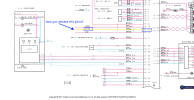
I greatly appreciate everyone’s input and advice. CN 12-15, CN 15-12, 15-13, 15-14 all have power with the key on. That was what I checked initially when I verified the CPU was getting power and properly grounded. I have not checked to outputs to the gauge cluster with an oscilloscope. That is something I will try next. The fact that the gauge operates normally when the problem doesn’t arise makes me think the communication link is sound between the gauge cluster and CPU. I’ve also noticed a cyclical nature to this issue. If the machine sits for 24-48 hours something resets and it operates normally. When you start it for a second time it throws the CPU failure code and stops functioning properly. Lachau what do you make of the voltage reading at CN 17-3 and CN 17-4? I’m getting 18.9 volts at these pins with the key on and the diagram states they are outputs that are either supposed to be GND or Open. Does the fact there is voltage at these pins mean I can infer the computer is sending an erroneous signal? Also CN 14-3, 14-4, 14-5 are all reading 13.7 volts at the pins on the computer with the key on. These are inputs that are labeled as GND or Open. I don’t have a good explanation for why there is voltage there either? When I disconnect the plug from the CPU and check the plug end I do not have any incoming voltage
Those voltage readings on CN17 and 14 aren't what you would expect to see from a controllers output or input which would normally be pulled high or low. Try checking the controllers rpm sensor input and the engines alternator charging output for any unusual voltage readings before plugging in the new controller.
Kind regards
I disconnected the alternator just to eliminate that variable and I put new batteries in the machine. The issue has still persisted. I have not checked the rpm sensor input yet. That is something I can try
LACHAU
Senior Member
...The fact that the gauge operates normally when the problem doesn’t arise makes me think the communication link is sound between the gauge cluster and CPU. I’ve also noticed a cyclical nature to this issue. If the machine sits for 24-48 hours something resets and it operates normally. When you start it for a second time it throws the CPU failure code and stops functioning properly.
As you can see: CN17-3 & CN17-4 are "SWING FLASH LIGHT" and are unrelated to Mechanical Controller error codes.Lachau what do you make of the voltage reading at CN 17-3 and CN 17-4? I’m getting 18.9 volts at these pins with the key on and the diagram states they are outputs that are either supposed to be GND or Open. Does the fact there is voltage at these pins mean I can infer the computer is sending an erroneous signal? Also CN 14-3, 14-4, 14-5 are all reading 13.7 volts at the pins on the computer with the key on. These are inputs that are labeled as GND or Open. I don’t have a good explanation for why there is voltage there either? When I disconnect the plug from the CPU and check the plug end I do not have any incoming voltage
CN14-4; and CN14-5 are options for EU market. You see voltage on those pins is normal.
Pin CN14-3 You see the voltage on this pin is normal also.
They are switches, You can see GND when they act only.
LACHAU
Senior Member
Based on these facts about your machine. I think some components of the CPU system (CPU, ROM, RAM) have loose pins. Open it up, check it carefully and solder them if necessary....I’ve also noticed a cyclical nature to this issue. If the machine sits for 24-48 hours something resets and it operates normally. When you start it for a second time it throws the CPU failure code and stops functioning properly.
I fixed it!!! Lachau you sent me down the right path. I disassembled the gauge cluster and the computer but did not find any loose components or obvious signs of bad components. I then reinstalled the computer and gauge cluster and was going to check the signals coming from the computer to the gauge cluster with an oscilloscope. But I checked the harness diagram first and realized there was a connector under the right arm rest near the floor that linked the gauge cluster to the computer. I figured I should trace that harness first and make sure it wasn’t damaged and when I took some panels off and found the connector I pulled it apart and found some corrosion in the connector. I cleaned this connector and put it back together and the machine fired up and ran perfectly! Your tip that a malfunction involving the gauge cluster can cause the CPU failure code to pop up was the key. I did not realized the gauge cluster could cause that issue. Thankfully the computer I ordered for 2500$ from kobelco has not arrived to the dealership yet. Lachau I can’t thank you enough!
LACHAU
Senior Member
Congratulations.I fixed it!!! Lachau you sent me down the right path. I disassembled the gauge cluster and the computer but did not find any loose components or obvious signs of bad components. I then reinstalled the computer and gauge cluster and was going to check the signals coming from the computer to the gauge cluster with an oscilloscope. But I checked the harness diagram first and realized there was a connector under the right arm rest near the floor that linked the gauge cluster to the computer. I figured I should trace that harness first and make sure it wasn’t damaged and when I took some panels off and found the connector I pulled it apart and found some corrosion in the connector. I cleaned this connector and put it back together and the machine fired up and ran perfectly! Your tip that a malfunction involving the gauge cluster can cause the CPU failure code to pop up was the key. I did not realized the gauge cluster could cause that issue. Thankfully the computer I ordered for 2500$ from kobelco has not arrived to the dealership yet. Lachau I can’t thank you enough!
I'm glad I was able to help you resolve the issue.
Unfortunately I was too quick to claim it was fixed I guess! We used the machine for the day yesterday and it worked flawlessly. I was tearing out trees and putting in drainage culverts on the other end of the farm. Today when we went to start it at the beginning of the day it threw the CPU code again. I tried cleaning the connector and it did not work. I unplugged the Gauge cluster and disconnected the battery and let it sit for a few hours and then started it back up and it worked. So I worked for a few hours and finished setting the concrete culvert pipes that I had to set and then I shut the machine down. I was curious if it would throw the code so I immediately tried to start it up and it threw the code again and it’s back to not functioning and saying CPU failure once more. At this point I’m wondering if there is a communication issue between the CPU and the gauge cluster or something surging on start up. It’s almost as if it resets after some period of time. If it sits for a while it will fire right up and you can run it for hours with no issue but as soon as you turn it off and back on it throws the CPU code. It has never thrown the code while the machine is running. It only faults when you shut it off and back on. I think this detail is important to the cause of the issue. It’s not just a loose connection that intermittently faults. It is something related to start up
LACHAU
Senior Member
Please carefully measure the voltage of pin CN12-15 (key on) right at startup to see if it has enough voltage. Then try using another wire to connect directly to pin CN12-15 (key on) to see the result.
I also checked the communication between the gauge cluster and the CPU. I’m getting a 2.5 v signal at the connector on the computer, the harness under the seat, and at the gauge cluster. I think communication is intact to the gauge cluster. This is the waveform as you hit the key on my oscilloscope. It peaks and then immediately levels off and stays constant around 2.5 volts
Attachments

At this point I think I’ve exhausted all my options besides buying the CPU. I think I’m going to have to bite the bullet and just buy the CPU for 2500$. My local dealer has one already programmed for my machine. He got it ordered when I called initially for this problem. I’m not totally sure it’s the CPU but I don’t know how else to explain this issue. I’ve checked everything I can think of to check. This is such a strange intermittent problem. Does anyone have any other thoughts? Has anyone ever seen a CPU issue like this that is intermittent? I would think a solid state component in the CPU would fail completely or not at all but maybe it’s more nuanced that I realize
Kobe Steel
Senior Member
Is it possible to simulate the fault by removing the controller and gauge cluster and setting these up on a bench with a test bench power supply, ground and communication lines connected?. If the controller is the issue then I would think it would still throw up the same fault where it drops out all communication to the gauge cluster. Just an idea
Kind regards
Kind regards
I wanted to complete this thread just in case anyone has this issue in the future. The problem was the CPU. I put a new one in and it said ROM Failure, which is expected, so I completed the A adjustment per my shop manual and then the machine fired right up and operated perfect. I ran it for a week off and on and wanted to wait to post, just to make sure it didn’t fault again. But that solved the issue. I didn’t think a CPU would fail intermittently and I still don’t know exactly what particular component failed intermittently inside the CPU but it definitely was the problem. About drove me mad chasing faults that didn’t exist when in reality it was the CPU the whole time. But I will chalk it up as a learning experience. I learned a heck of a lot about my machine so that never hurts. Thank you all for your input and advice, I appreciate it.