• Thank you for visiting HeavyEquipmentForums.com! Our objective is to provide industry professionals a place to gather to exchange questions, answers and ideas. We welcome you to register using the "Register" icon at the top of the page. We'd appreciate any help you can offer in spreading the word of our new site. The more members that join, the bigger resource for all to enjoy. Thank you!

D6R 9PN Code

Kool J

Member
Joined
Jun 6, 2025
Messages
23
Location
Antigua And Barbuda
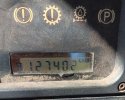
Greetings, Can anyone tell me what does this error code 12740.2 represent on the Cat D6R 9PN Doser? Thanks in advance for your assistance.

 

Kool J

Member
Joined
Jun 6, 2025
Messages
23
Location
Antigua And Barbuda
This is the photo sent to me from the owner. I suspect it may be an hour meter instead of a code, since the hour glass symbol is infront of it. What are your thoughts?
 

Attachments

  • IMG-20260510-WA0001.jpg
    IMG-20260510-WA0001.jpg
    406.1 KB · Views: 10

Kool J

Member
Joined
Jun 6, 2025
Messages
23
Location
Antigua And Barbuda
Lol thank you. Just as I thought. This happens when someone buys a piece of equipment without having any knowledge about it or its operations. Happening alot here in Antigua and Barbuda.
 

Deimos

Well-Known Member
Joined
Nov 8, 2024
Messages
222
Location
RUS
To display the code on the screen, you need to press the scroll key 2.

Press switch (2) . The service code indicator indicates that a diagnostic code problem may exist. The diagnostic code may be active. This function will scroll through the parameters. These parameters display the diagnostic codes. The diagnostic codes will continue to scroll through the codes until switch (2) is depressed.

1778658697280.png
 

Nige

Senior Member
Joined
Jun 22, 2011
Messages
38,596
Location
G..G..G..Granville.........!! Fetch your cloth.
The fact that the SERV CODE icon is lit indicates that the machine has one or more Active Diagnostic Codes. Follow the instructions above to access the list of Codes one by one and take particular note of any that have the SERV CODE icon lit as you scroll through the list. Those are the ones to potentially be concerned about.
 

Nige

Senior Member
Joined
Jun 22, 2011
Messages
38,596
Location
G..G..G..Granville.........!! Fetch your cloth.
I failed to mention that when using the switch (2) to scroll through the Codes, each Code that pops up on the window of the Monitor Panel will appear as two lines, with a couple of seconds between each line.

1. First the module that the Code is stored in will appear. The common ones for a D6R would be 030, 036, & 113 but there may be others.

2. After a couple of seconds the next line (of the same Code) will appear. This takes the form of an alphanumeric sequence indicating the Component involved and the Failure Mode. In the example below the Component is 096 and the Failure Mode is F03. The fact that the SERV CODE icon is illuminated indicates the Code in the illustration was Active.

upload_2019-7-25_11-8-28-png.199660
 

Kool J

Member
Joined
Jun 6, 2025
Messages
23
Location
Antigua And Barbuda
I failed to mention that when using the switch (2) to scroll through the Codes, each Code that pops up on the window of the Monitor Panel will appear as two lines, with a couple of seconds between each line.

1. First the module that the Code is stored in will appear. The common ones for a D6R would be 030, 036, & 113 but there may be others.

2. After a couple of seconds the next line (of the same Code) will appear. This takes the form of an alphanumeric sequence indicating the Component involved and the Failure Mode. In the example below the Component is 096 and the Failure Mode is F03. The fact that the SERV CODE icon is illuminated indicates the Code in the illustration was Active.

upload_2019-7-25_11-8-28-png.199660
Okay great. I will check. Won't be back at that machine before Saturday. Will keep you updated. Your help is greatly appreciated.
 
Top